
One multichannel API layer
Send and receive across SMS, WhatsApp, RCS, and email through one integration and one authentication model. Adding a channel later is a configuration change, not a project.

Connect one API to your CRM, ERP, billing, or logistics systems and let real events trigger the message — a shipment that moved, a payment that came due, a login that needs verifying. Messangi consolidates SMS, WhatsApp, RCS, and email behind a single integration, with webhooks and events in both directions and delivery visibility your operations team can read without opening a ticket.
Most enterprises running operations across the US and LATAM describe the same situation: messaging is spread across vendors and internal scripts, every new use case needs engineering, and nobody has one view of what was sent or delivered. Adding another single-channel API doesn’t fix that — it adds a fourth place to look. What changes the picture is one integration that covers every channel, plus a team in your time zone when a route misbehaves at 2 a.m.
curl -X POST https://api.messangi.com/v1/messages \ -H "Authorization: Bearer $MESSANGI_API_KEY" \ -H "Content-Type: application/json" \ -d '{ "channel": "sms", "to": "+15551234567", "template": "order_shipped", "variables": { "order": "A-4471" } }'
{
  "id": "msg_7Hq2KxP4",
  "status": "queued",
  "channel": "sms"
}
const messangi = new Messangi(process.env.MESSANGI_API_KEY);const res = await messangi.messages.send({ channel: "whatsapp", to: "+525512345678", template: "payment_due", variables: { amount: "1,240.00" }});console.log(res.status);
{
  "id": "msg_7Hq2KxP4",
  "status": "queued",
  "channel": "whatsapp"
}
messangi = Messangi(os.environ["MESSANGI_API_KEY"])res = messangi.messages.send( channel="rcs", to="+573001234567", template="appointment_reminder", variables={"time": "09:30"},)print(res.status)
{
  "id": "msg_7Hq2KxP4",
  "status": "queued",
  "channel": "rcs"
}
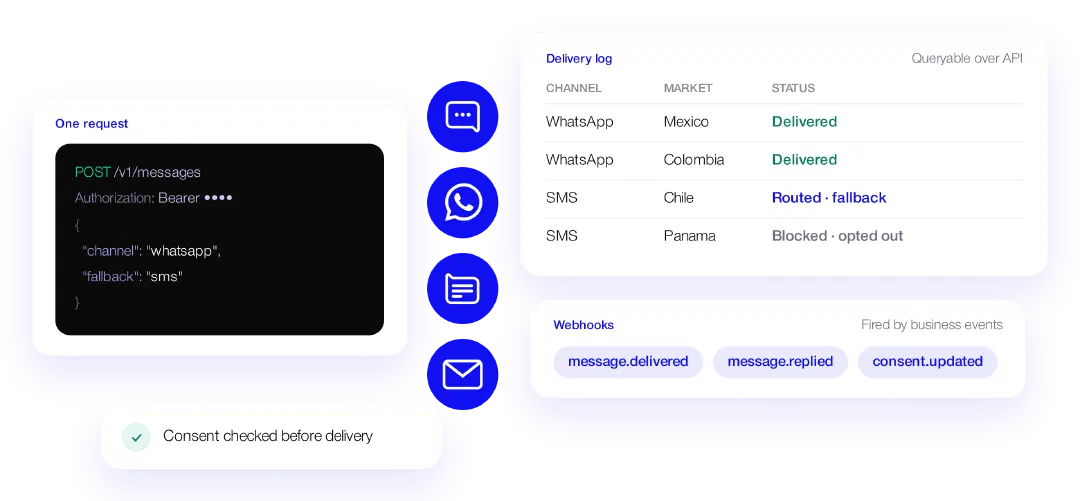
Send and receive across SMS, WhatsApp, RCS, and email through one integration and one authentication model. Adding a channel later is a configuration change, not a project.
Subscribe to delivery states, inbound replies, and consent changes. Fire messages from business events instead of scheduled jobs, so what customers receive matches what actually happened.
See how traffic is routed and where each message ends up, per channel and per market — with logs and callbacks your team can query, not a monthly summary.
Consent Management checks opt-in state before delivery, and the consent and sender registration rules of each market are applied to your traffic — handled by our team during onboarding rather than left as a form for yours.
See where Messangi operatesThe same channels are available in the Communications Console, so business teams can run a campaign or edit a template without a release.
The integration runs on REST for application traffic, with an SMPP gateway available for teams already sending over SMPP — both on the same platform, reporting to the same place. What sets the timeline is rarely the code: it’s WhatsApp verification and sender registration in each market, and our team handles that work alongside yours. You get an engineer from the first call rather than a documentation link, and a timeline for your specific markets rather than an average.
SMS, WhatsApp, RCS, and email share one integration and one authentication model. The documentation covers REST, SMPP, and webhooks.
Tell us which systems trigger customer communications today and where they break, and we’ll show you what the integration looks like end to end.
 SMS
SMS WhatsApp
 RCS
RCS Email
Email